10 Steps on How to Start Your Own SMM Panel Business in 2026
Hey, so you’re curious about learning how to start your own SMM panel business. Starting your own SMM panel business is actually a smart move right now because social media keeps growing fast, and more people want quick engagement, more reach, and more exposure. You can build a real income stream from this if you set it up the right way and focus on trust, quality, and stable service.
Basically, to start your own SMM panel business, you need a domain, hosting, an SMM panel script, reliable service providers, payment gateways, and a clear plan for pricing, support, and promotion.
You also need to follow safe practices, test services, and build trust so customers stay with you for a long time.
Let’s show you the overall process in detail.
Content Summary
What Exactly is an SMM Panel?
An SMM panel is basically a website where people can buy social media services. Think Instagram followers, YouTube views, TikTok likes, Facebook engagement, and all that stuff.
You're not doing the work manually, though. Your panel connects to service providers through something called an API. When someone orders 1000 Instagram followers from your site, the order goes to your provider automatically. They deliver it, and you keep the profit margin.
It's like being a middleman, but in a good way. You make money on the difference between what you pay the provider and what you charge your customers.
Why 2026 Is the Perfect Time to Start Your Own SMM Panel Business
The demand for social media services isn't going anywhere. In fact, it's getting stronger. Here's why 2026 is actually a great year to jump in:
Social Media Usage is at an All-Time High
More people are on social media than ever before. Businesses need it. Influencers need it. Even your local coffee shop needs it. Everyone wants to grow their following and engagement.
Competition Creates Better Tools
The market has matured. This means you have access to better scripts, more reliable SMM panel providers, and easier payment systems than people had just a few years ago.
Global Market Access
You can sell to anyone, anywhere. Your panel can serve customers from the US, Europe, Asia, Africa, wherever. The internet makes geography irrelevant.
Low Startup Costs
You can literally start this business with less than $100. Compare that to opening a physical store or most other online businesses. It's incredibly affordable.
Automation Does the Heavy Lifting
Once you set everything up properly, your panel runs itself. Orders are processed automatically. Payments come in automatically.
Understanding the SMM Panel Business Models
First, you must know about the business models before learning how to start your own SMM panel business. You have options when it comes to how you run your panel.
Let's break down the three main models:
Model 1: Reseller Panel (Best for Beginners)
This is where most people start, and honestly, it's the smartest choice for beginners. You connect your panel to established providers through their API. When someone buys from you, the order automatically goes to your provider. They fulfil it, and you keep your markup.
| Pros: | Cons: |
|---|---|
|
|
Model 2: Provider Panel (Advanced)
This is where you actually deliver the services yourself. You have your own network, your own systems, your own everything.
Model 3: Hybrid Model
You provide some services yourself and resell others. This gives you the best of both worlds once you're established. Our recommendation? Start as a reseller. Learn the business. Build your customer base. Then consider adding your own services later if you want to scale up.
The Real Numbers: What You Need to Invest in an SMM Panel Business
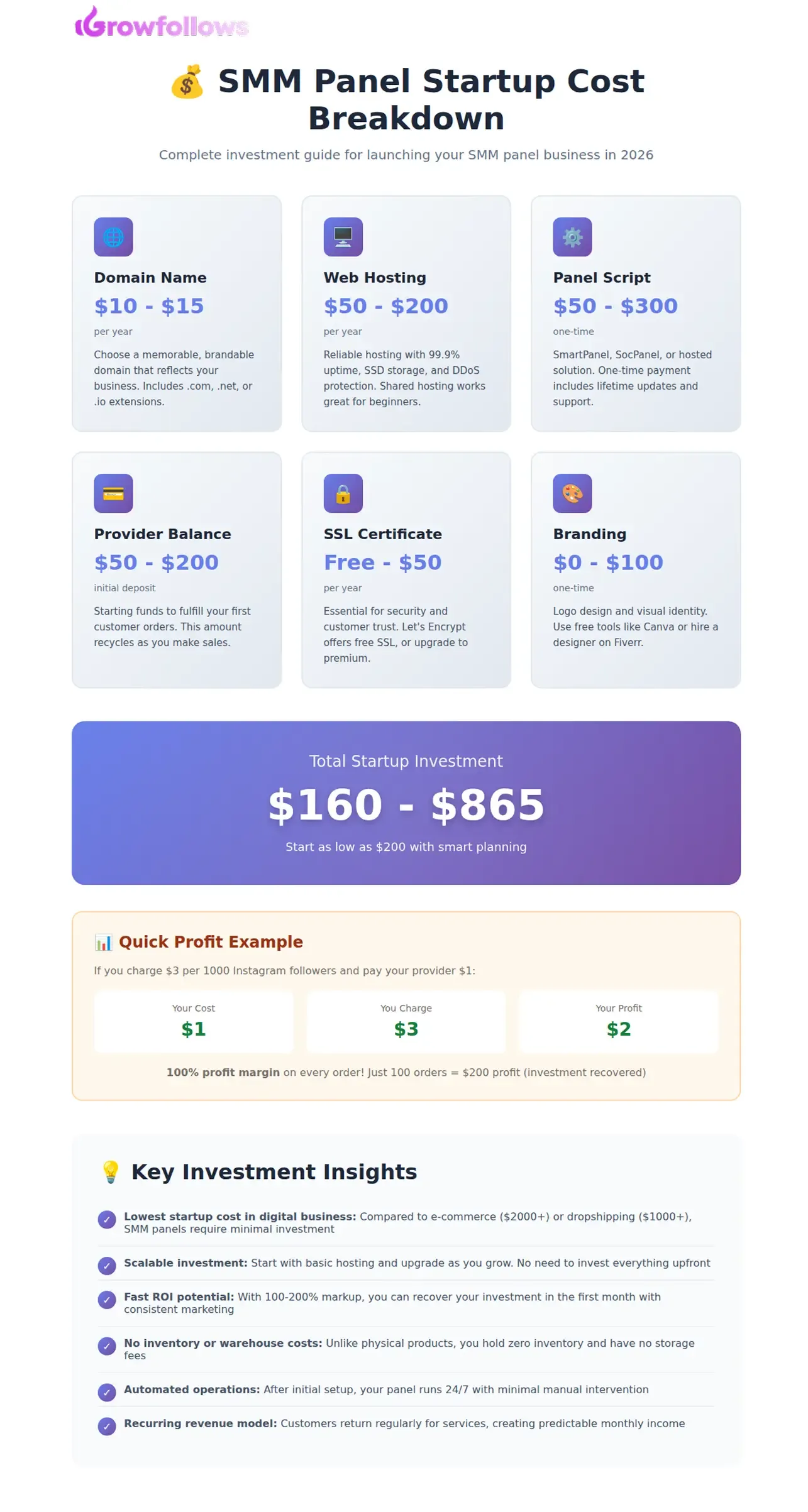
Let's talk money. Here's what you actually need to spend to get started:
| Pros: | Cons: |
|---|---|
|
|
| Expense | Cost Range (Varies) | Notes |
|---|---|---|
| Domain Name | $10 - $15/year | Choose something catchy and memorable |
| Web Hosting | $50 - $200/year | Shared hosting is fine to start |
| SMM Panel Script | $50 - $300 | One-time payment for most scripts |
| Initial Provider Balance | $50 - $200 | To fulfil your first orders |
| SSL Certificate | Free - $50/year | Essential for security and trust |
| Logo and Branding | $0 - $100 | Can use free tools like Canva |
| Total Startup Cost | $160 - $865 | Can start even lower with free hosting |
See? You don't need thousands of dollars. You can literally start with $200 if you're smart about it.
Here’s How to Start Your Own SMM Panel Business
Alright, let's get into the actual process. We'll walk you through each step carefully.
Step 1: Choose Your Niche and Services
You might think you should offer everything to everyone. Big mistake. It's better to start focusing.
Platform Options:
- Instagram (most popular choice)
- TikTok (super hot right now)
- YouTube (great for long-term customers)
- Facebook (still massive, especially for businesses)
- Twitter/X (niche but profitable)
- LinkedIn (business-focused, higher prices)
- Spotify (music promotion)
- Telegram (growing fast)
Service Categories:
- Followers and subscribers
- Likes and reactions
- Comments and shares
- Views and impressions
- Story views
- Live stream viewers
- Saves and bookmarks
- Account verification services
Our advice? Start with Instagram and TikTok. These are the two most demanded platforms right now. You can expand later.
Target Audience Ideas:
- Small business owners
- Influencers and content creators
- Digital marketing agencies
- Music artists and bands
- Real estate agents
- E-commerce stores
- Personal brands
- Local businesses
Step 2: Get Your Domain and Hosting
Your domain name is important. It's your brand. It's how people will find you and remember you.
Tips for Choosing a Domain:
- Keep it short and simple
- Make it easy to spell
- Avoid numbers and hyphens
- Include keywords if possible (like "boost" or "grow")
- Make it memorable
- Check if social media handles are available too
For Hosting, You Need:
- At least 99.9% uptime guarantee
- SSD storage for faster loading
- Good customer support (24/7 is ideal)
- DDoS protection
- Easy control panel (cPanel or DirectAdmin)
- Room to scale as you grow.
Step 3: Choose and Install Your Panel Script
This is where your panel actually comes to life. You need software that runs everything.
Popular SMM Panel Scripts:
| 1. SmartPanel |
|
| 2. SocPanel |
|
| 3. PerfectPanel (Hosted Solution) |
|
Installation Process (For Self-Hosted Scripts):
- Purchase your chosen script
- Download the files
- Upload to your hosting via FTP or file manager
- Create a MySQL database
- Run the installation wizard
- Enter your database details
- Set up your admin account
- Configure basic settings
- Install an SSL certificate
- Test everything thoroughly
Don't worry. Most hosting providers offer one-click installers for popular scripts. Or you can hire someone on Fiverr for $20-50 to install it for you.
Step 4: Connect to Service Providers
This step is super important. Your service provider is the one who actually delivers the orders your customers buy. So you need a provider you can trust.
What to Look For in a Good Provider:
Pick a provider that offers:
- fast and stable delivery
- real and helpful support
- fair and consistent pricing
- API integration
- refill and guarantee policy
- wide service list
- good reviews and a clean reputation
If your provider is weak, your panel will feel weak too. So take time here.
What to Look For in a Good Provider:
Pick a provider that offers:- fast and stable delivery
- real and helpful support
- fair and consistent pricing
- API integration
- refill and guarantee policy
- wide service list
- good reviews and a clean reputation
If your provider is weak, your panel will feel weak too. So take time here.
How API Connection Works
The process is simple:
- Create an account with your provider
- Add some funds
- Go to their API section
- Copy your API key
- Open your panel admin area
- Add the provider API
- Sync the services you want to sell
- Set your own pricing
- Place a small test order first
If the test goes fine, you are ready to sell.
A Quick Word About Providers
There are many providers in the market. Some focus on the cheapest rates. Some focus on quality. Some balance both. Always choose the one that matches the kind of service you want to offer.
Many panel owners also like working with Growfollows because it is stable, easy to use, and has been active for years. So if you want a reliable source, you can also connect your panel to Growfollows as a provider.
The main goal is simple. Pick a provider that you trust. Then build your reputation on top of that trust.
Start growing your social media now with Growfollows – sign up and boost your followers today!Pricing Strategy:
Here's a simple formula: Take the provider's price and add 100-200% markup for retail customers, 50-100% for resellers.
Example:
- Provider price: $1 per 1000 Instagram followers
- Your price to regular customers: $2-3
- Your price to resellers: $1.50-2
This gives you healthy profit margins while staying competitive.
Step 5: Set Up Payment Methods
You need ways for people to pay you. The more options you offer, the more customers you can serve.
Payment Options for 2026:
Cryptocurrency (Highly Recommended)- Bitcoin
- Ethereum
- USDT (Tether)
- USDC
- Litecoin
Why crypto? Because it's fast, global, has low fees, and no chargebacks. Perfect for this business.
Manual Payment Methods
- Bank transfer
- Western Union
- MoneyGram
- bKash (Bangladesh)
- Paytm (India)
- GCash (Philippines)
- Pix (Brazil)
- Mobile money (Africa)
Online Payment Gateways
- PayPal (requires business registration)
- Stripe (requires business registration)
- PayOp
- Coinbase Commerce
- Perfect Money
- Payeer
Start with crypto and manual payments. They don't require business registration and work globally. Once you're making consistent money, register your business and add PayPal and Stripe.
Step 6: Design Your Website
Your website is your storefront. It needs to look professional and work smoothly.
Essential Pages You Need:- Homepage (clear value proposition)
- Services page (all your offerings)
- Pricing page
- FAQ page
- Terms of service
- Privacy policy
- Contact page
- Blog (for SEO)
Keep your SMM panel design clean and easy. Do not add too many things. Use white space and simple navigation. Make sure the site works great on mobile first because most users visit from phones.
Keep the loading speed fast because people leave after a few seconds. Add trust signals like reviews, total orders, security badges, live chat, and clear contact details.
And always use clear buttons that tell people what to do next, like Sign Up Now or Get Started.
Step 7: Create Your Service Catalogue
In this step, you set up and organise all the services you want to sell on your SMM panel. Create clear service listings that show important details like platform, start time, speed, refill policy, quality, and price.
Keep the descriptions simple so people understand what they are buying. Then group services by platform, such as Instagram, TikTok, YouTube, and Facebook, and inside each group, add options like followers, likes, views, comments, and more.
A clean and clear service catalogue helps customers choose fast and trust your panel.
Step 8: Set Up Your Admin Dashboard
Your admin dashboard is the main control centre of your SMM panel, so you should keep it organised and check it daily. From there, you can see key stats like revenue, active orders, new users, and provider balance.
You can also manage orders, refund or cancel them, handle user accounts, adjust balances, and review financial reports to track profit and expenses.
The dashboard also lets you manage services, update prices, edit descriptions, and turn services on or off. When this area runs smoothly, your whole panel runs smoothly.
Step 9: Legal and Compliance Requirements
Let's talk about the serious stuff. You need to protect yourself legally.
Essential Legal Documents:
Terms of Service should include:
- Service description
- User responsibilities
- Refund policy
- Prohibited uses
- Liability limitations
- Account termination conditions
Privacy Policy Must cover:
- What data you collect
- How you use it
- How you protect it
- Cookie usage
- Third-party sharing
- User rights
Refund Policy Be clear about:
- When refunds are available
- How to request refunds
- Processing time
- Partial refunds
- Non-refundable situations
Step 10: Marketing Your SMM Panel
Building it is just the start. Now you need customers.
Free Marketing Methods:
You can promote your SMM panel for free by creating useful YouTube videos, writing helpful blogs, and building a strong presence on social media. Share tips about social media growth, show real results, and explain how your panel works.
Also, join online communities like Telegram, Discord, Reddit, Quora, and Facebook groups. Talk with people, answer questions, and help them. When you give value first, people trust you, and many of them later become your customers.
Paid Marketing Methods:
You can grow your SMM panel faster with paid marketing like Facebook, Instagram, and Google ads. Start with a small daily budget and target small business owners, influencers, and creators who want social media growth.
You can also work with micro influencers by giving them free services or paying for posts so they promote you. Another strong method is building reseller and affiliate programs.
Resellers buy from you at lower prices and sell to their own customers, while affiliates earn a commission for every sale they bring. These two methods help you get more customers without doing all the marketing yourself.
Advanced Strategies for Successful SMM Panel Business in 2026
To run a successful SMM panel in 2026, focus on great customer support, strong quality control, and keeping your customers loyal. Offer fast support through live chat, tickets, email, or WhatsApp, and reply as quickly as possible.
Always test your services, watch delivery speed and drop rates, and change providers if quality falls. Give customers options like economy, standard, and premium services so they can choose based on budget.
Build loyalty with rewards, emails, and push notifications to keep them coming back. As you grow, automate tasks like orders and payments, and hire help for support, marketing, or tech work when the workload becomes too much.
Risk Management and Problem Solving
Running an SMM panel means problems will come up, so you should be ready. If a provider goes down, have backup providers so you can switch fast. Chargebacks can happen, so use safe payment methods and keep clear terms.
If accounts or payments get suspended, spread your risk and do not depend on one account. When service quality drops, test often, change providers quickly, and offer refunds or refills when needed.
If your competitors lower prices, you should focus on better quality and support instead of a price war. And when social platforms change their rules, stay updated, learn from SMM communities, and explain everything clearly to your customers.
Staying Legal and Ethical
The elephant in the room: Is this legal? Is it ethical?
The Legal Reality:Selling social media services is legal in most countries. You're providing a service that people want to buy. However:
- Don't make false claims
- Be honest about what you offer
- Follow your country's business laws
- Pay taxes on your income
- Respect the platform's terms of service
Let's be honest. These services provide artificial engagement. They don't build real communities. They inflate numbers.
What You Can Do:- Be transparent about what you offer
- Don't claim services are "100% real people"
- Educate customers about organic growth, too
- Offer quality over quantity when possible
- Don't target vulnerable people
People will buy these services whether you offer them or not. If you provide good quality, fair prices, and honest service, you're actually helping people avoid scams. Just be ethical about it.
Wrapping Up and Action Steps
So, that’s all about how to start your own SMM panel business. Starting an SMM panel in 2026 is still very profitable if you do it right. First, pick your niche, set up your domain, hosting, and panel, and connect with a good provider. Then add payments, services, design, and support, and test everything. In the first month, focus on free marketing and helping your first customers. After that, slowly add paid ads, build content, grow your email list, and start an affiliate program. Over time, register your business, add more payment options and services, build a small team, and scale your panel step by step.
Resources and Tools
Here are the tools and resources that will help you:
Essential Services:- Domain: Namecheap, GoDaddy
- Hosting: Owrbit, A2 Hosting, DigitalOcean
- Scripts: SmartPanel, SocPanel
- Provider: Growfollows
- Design: Canva, Figma
- YouTube (SMM panel tutorials)
- Reddit (r/socialmediamarketing)
- Telegram groups (SMM panel communities)
- Facebook groups (SMM providers and resellers)
- Analytics: Google Analytics
- Email: Mailchimp, SendGrid
- Chat: Tawk.to, LiveChat
- Accounting: Wave, QuickBooks
- Project Management: Trello, Notion